How Do I Find Duplicate VINs in a Spreadsheet or List?
Short answer: paste the VIN column into the Bulk VIN Validator and read the Duplicates count. It ignores capital letters, spaces and quotes around a VIN, so most repeats show up. It will not match a VIN written with a hyphen or a space inside it. For those, clean the VINs first with the spreadsheet formulas or the script below.
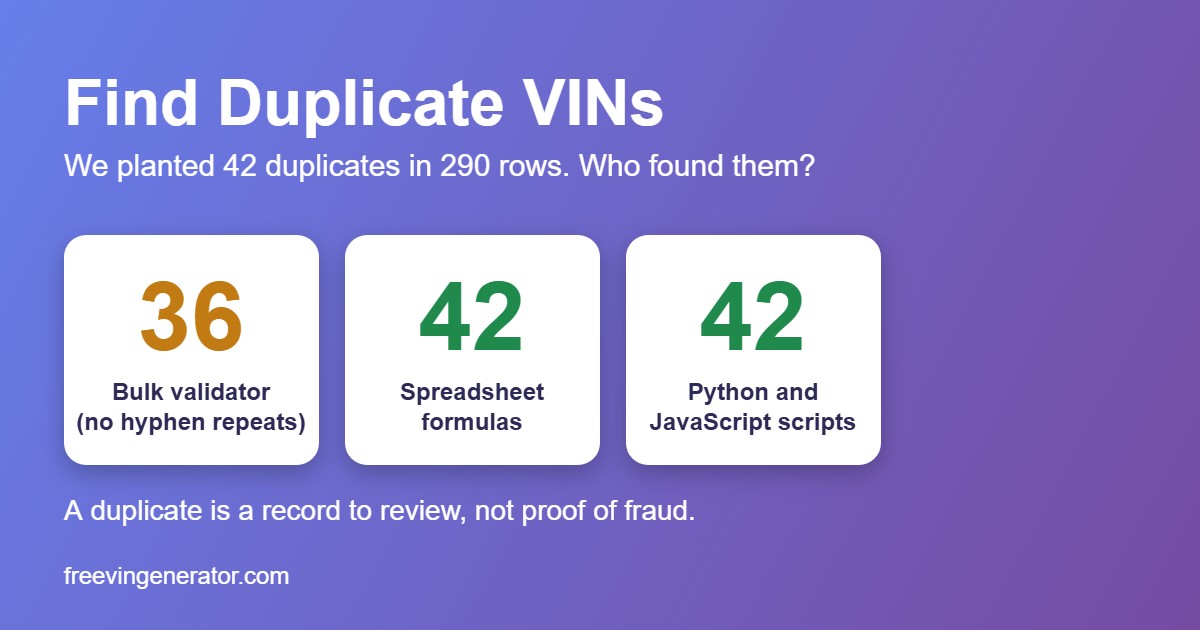
We tested this instead of guessing. We built a 290-row fake inventory with 42 duplicate rows planted in it, then ran four methods on it. One of them found all 42 at once. The one most people reach for first found 36.
Why the Same VIN Shows Up Twice
| What you see | What it means | What to do |
|---|---|---|
| The same VIN in two rows, with a different lot or source | A merge of two systems, or the car moved | Keep the newest row. Do not delete blindly |
| One copy is in lowercase, or has spaces around it | Same VIN, typed differently | Clean the text first. The Bulk VIN Validator and the formulas below do this |
| One copy has a hyphen or a space inside | Same VIN, formatted by a person | The Bulk VIN Validator calls this invalid, not a duplicate. Clean it with the formulas or script |
| Two VINs differ by one character | Not a duplicate. Almost always a typo | Check the check digit. In our file it caught all 8 typos |
| One VIN appears three times | Two extra rows, not one | Count extra rows when you plan the cleanup |
A duplicate flags a record for you to review. It does not prove fraud, and a repeat VIN is far more often a data-entry or merge problem.
How We Tested
We started from the 240 valid sample VINs in our test-data hub and built one row for each: stock number, make, model, year, source and lot. Then we planted these problems:
- 20 VINs repeated exactly
- 10 repeated in lowercase or with spaces around them
- 6 repeated with a hyphen or a space inside
- 3 VINs that appear three times in all
- 8 one-character typos that look like duplicates but are different VINs
The true answer: 39 duplicate groups and 42 extra rows to remove. The VINs are synthetic and do not belong to real vehicles. You can download the 290-row sample file and try every method yourself.
What Each Method Found
| Method | Duplicate rows found | What it missed or flagged |
|---|---|---|
| Bulk VIN Validator, on the page | 36 | The 6 hyphen or inner-space repeats, which it marked invalid. It marked 14 rows invalid in all: those 6 plus all 8 typos |
| Spreadsheet formulas | 42 | Nothing. 39 groups, 81 rows involved |
| Python script | 42 | Nothing. Also found the 8 typo pairs |
| JavaScript script | 42 | Nothing. Also found the 8 typo pairs |
The 8 typos are worth a note. The check digit caught every one of them in this file, but that is a property of this sample, not a guarantee. Our 100-VIN test shows the check digit misses some mistakes.
Method 1: The Bulk VIN Validator
- Open the Bulk VIN Validator.
- Paste your list, or upload a CSV or TXT file. If the first row has a column headed
VIN, the tool reads only that column. - Read the counts: checked, valid, invalid and duplicates. Filter by Duplicates to see each repeat and the row it repeats.
It checks up to 10,000 VINs. It treats two VINs as the same after it makes them upper case and trims quotes and spaces around them.
Method 2: Spreadsheet Formulas
Add three helper columns next to your VIN column. These assume the VIN is in column B and your data starts on row 2.
| Column | Formula in row 2 | What it does |
|---|---|---|
| H (clean VIN) | =UPPER(SUBSTITUTE(SUBSTITUTE(SUBSTITUTE(TRIM(B2)," ",""),"-",""),".","")) |
Upper case, no spaces, hyphens or dots |
| I (times in list) | =COUNTIF($H$2:$H$291,H2) |
How many rows share this VIN |
| J (status) | =IF(COUNTIF($H$2:H2,H2)>1,"duplicate","") |
Marks every repeat after the first |
Copy the formulas down, then filter column J for “duplicate”. Change 291 to your last row. On our file this marked 42 rows, with 81 rows in 39 groups, which matches the true answer.
One honest limit: we ran these formulas in HyperFormula, an open-source spreadsheet engine, and not in Excel or Google Sheets themselves. They use only standard functions. If your spreadsheet expects semicolons between arguments, swap the commas.
Method 3: A Short Script
Both scripts clean each VIN, group the rows, and report duplicate groups, the number of extra rows, and pairs of VINs one character apart. Save one next to duplicate-vins-sample.csv and run it.
Python 3
import csv
import re
from collections import defaultdict
from itertools import combinations

def normalize(raw: str) -> str:
    """Upper-case the VIN and drop everything that is not a letter or digit."""
    return re.sub(r"[^A-Z0-9]", "", raw.upper())

with open("duplicate-vins-sample.csv", newline="", encoding="utf-8-sig") as f:
    rows = list(csv.DictReader(f))

groups = defaultdict(list)
for row in rows:
    groups[normalize(row["vin"])].append(row["stock_no"])

duplicates = {vin: ids for vin, ids in groups.items() if len(ids) > 1}
print("rows:", len(rows))
print("duplicate groups:", len(duplicates))
print("extra rows to remove:", sum(len(ids) - 1 for ids in duplicates.values()))

# Possible typos: two different VINs that differ by exactly one character.
pairs = [(a, b) for a, b in combinations(groups, 2)
         if len(a) == len(b) and sum(x != y for x, y in zip(a, b)) == 1]
print("pairs one character apart:", len(pairs))
JavaScript (Node 18 or newer)
// Node 18 or newer. Run next to duplicate-vins-sample.csv.
const fs = require('fs');

function parseCsv(text) {
  const rows = []; let row = [], cell = '', quoted = false;
  for (let i = 0; i < text.length; i++) {
    const c = text[i];
    if (quoted) {
      if (c === '"' && text[i + 1] === '"') { cell += '"'; i++; }
      else if (c === '"') quoted = false;
      else cell += c;
    } else if (c === '"') quoted = true;
    else if (c === ',') { row.push(cell); cell = ''; }
    else if (c === '\n') { row.push(cell.replace(/\r$/, '')); rows.push(row); row = []; cell = ''; }
    else cell += c;
  }
  if (cell || row.length) { row.push(cell); rows.push(row); }
  return rows;
}

const normalize = raw => raw.toUpperCase().replace(/[^A-Z0-9]/g, '');

const [header, ...data] = parseCsv(fs.readFileSync('duplicate-vins-sample.csv', 'utf8').replace(/^\uFEFF/, ''));
const vinCol = header.indexOf('vin'), idCol = header.indexOf('stock_no');
const groups = new Map();
for (const r of data) {
  if (!r[vinCol]) continue;
  const key = normalize(r[vinCol]);
  groups.set(key, [...(groups.get(key) || []), r[idCol]]);
}
const duplicates = [...groups].filter(([, ids]) => ids.length > 1);
console.log('rows:', data.filter(r => r[vinCol]).length);
console.log('duplicate groups:', duplicates.length);
console.log('extra rows to remove:', duplicates.reduce((s, [, ids]) => s + ids.length - 1, 0));

// Possible typos: two different VINs that differ by exactly one character.
const keys = [...groups.keys()];
let pairs = 0;
for (let i = 0; i < keys.length; i++) {
  for (let j = i + 1; j < keys.length; j++) {
    const a = keys[i], b = keys[j];
    if (a.length === b.length && [...a].filter((ch, k) => ch !== b[k]).length === 1) pairs++;
  }
}
console.log('pairs one character apart:', pairs);
Both print 290 rows, 39 duplicate groups, 42 extra rows and 8 pairs one character apart on our sample file.
Before You Delete Anything
- Keep the original file. Work on a copy.
- Compare the duplicate rows. If the lot, price or date differs, decide which row is right.
- Look at the one-character pairs. Fix the typo instead of deleting a row that may be a different car.
- Run the cleaned list through the validator. The Bulk VIN Validator shows the VINs that fail the length, character or check-digit test.
Keep Reading
- How to Validate Multiple VINs at Once (Free Bulk Tool)
- We Tested 100 VINs: Which Pass Validation and Why?
- How to Validate a VIN in Code
- How to Calculate a VIN Check Digit
- How to Check If a VIN Is Valid (and Spot a Cloned One)
- How to Put QR Codes on Every Fleet Vehicle From a VIN List
Free tools: Bulk VIN Validator · VIN Validator · VIN Test Data · Check Digit Calculator