Code 39 or Code 128 for a VIN Barcode? We Tested Both
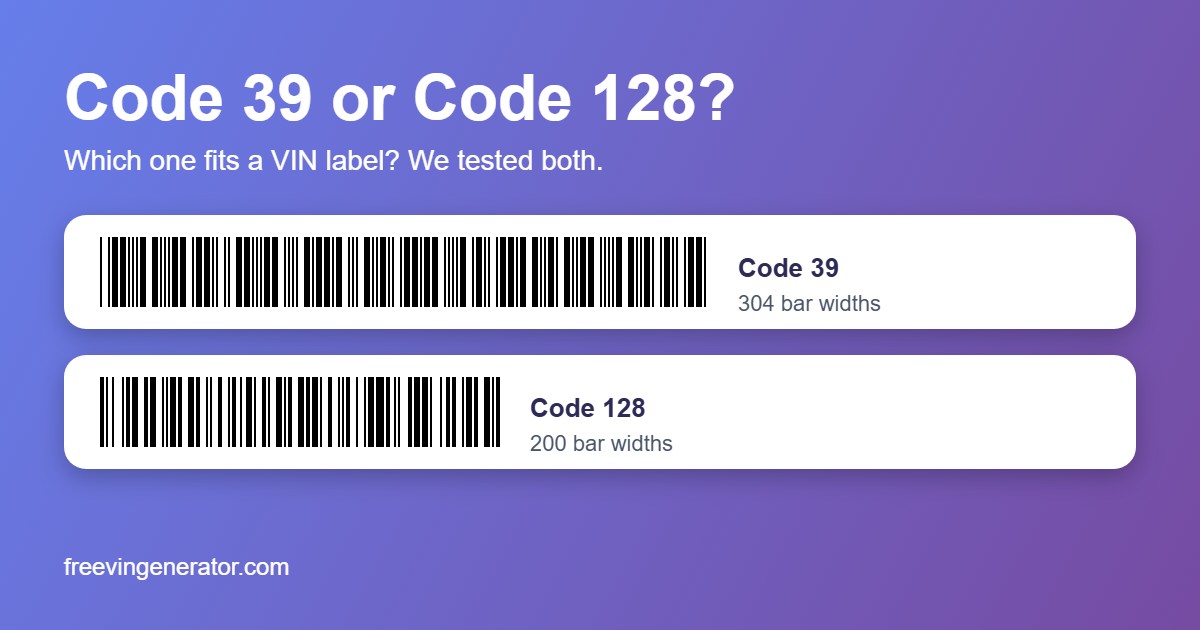
Short answer: if your label is narrow, use Code 128. A 17-character VIN needs 304 bar widths in Code 39 and only 200 in Code 128, so at the same print quality Code 128 is about a third shorter. If the system or scanner you feed already expects Code 39, which is the format on factory VIN labels, stay with Code 39. Either way, check that what you scan is 17 characters long.
That is the practical answer. The rest of this article is the evidence, and one result that surprised us: when we pushed both codes to the smallest size that still scanned, the length advantage nearly disappeared.
Which Problem Do You Have?
| Problem | What is going on | Fix |
|---|---|---|
| The barcode does not fit on my label | Code 39 is 304 bar widths long, plus a blank margin on each side. At 2 printer dots per bar and 300 dpi that is about 55 mm | Switch to Code 128, about 37 mm at the same settings, or use a QR code |
| The scanner returns a short or wrong VIN | A damaged Code 39 can still decode as a valid but shorter string, because it has no check character by default | Reject anything that is not 17 characters, then run the VIN validator |
| My Code 128 label fails at 203 dpi | Code 128 needs bigger bars than Code 39 to read reliably (test 2 below) | Keep at least 2 printer dots per bar, never squeeze it to fit |
| The scanner ignores my Code 128 label | Some scanners have certain barcode types switched off | Scan a test label first and check the scanner’s settings |
| The label gets scratched | Both fail the same way: a cut across the bars kills either code, a scratch along the bars hurts neither | Print the VIN as text too, and see our damage test |
How We Tested
We used 20 VINs and drew each as a Code 39 and a Code 128 barcode with the same library behind our barcode generator. Then we added a little blur and sensor noise, as in our earlier size test, and decoded each image with ZXing, an open-source reader. A try counts as a success only when the exact VIN comes back.
One limit up front. This is one software reader and simulated damage, not a phone or a scanner gun. Use the numbers to compare the two codes, and scan a real printed sample before you print a batch.
Test 1: How Long Is Each One?
At 2 pixels per bar, every test VIN came out the same length: 608 pixels for Code 39 and 400 for Code 128. Code 128 had one trick behind that. Its encoder switches to a digits-only mode for the last six characters, and in a real VIN those are always digits. That squeezes two digits into each symbol.
| Code 39 | Code 128 | |
|---|---|---|
| Bar widths for a 17-character VIN | 304 | 200 |
| With blank margins | 324 | 220 |
| Length at 2 dots per bar, 300 dpi | 55 mm | 37 mm |
| Length at 2 dots per bar, 203 dpi | 81 mm | 55 mm |
The lengths include the blank margin each code needs. Add your own label margin on top, which is why our label maker quotes a slightly larger label for Code 39.
Test 2: How Small Can Each One Get?
Here is the surprise. We shrank each barcode until the reader gave up. The table shows how many of 60 tries read at each bar width, measured in camera pixels per narrow bar.
| Pixels per narrow bar | Code 39 | Code 128 |
|---|---|---|
| 0.9 | 0 | 0 |
| 1.1 | 60 | 0 |
| 1.25 | 60 | 9 |
| 1.4 | 60 | 19 |
| 1.5 | 60 | 0 |
| 1.6 | 60 | 53 |
| 1.75 | 60 | 60 |
| 2.2 | 60 | 60 |
Code 39 read from 1.1 pixels. Code 128 was unreliable until 1.75. (A perfectly pixel-aligned 1.0 render read for both, but real cameras never line up that neatly, so trust the in-between rows.)
The reason is how each code is built. Code 39 only has to tell narrow bars from wide ones. Code 128 uses four different bar widths and the reader has to measure them accurately, so blur hurts it sooner. At their limits Code 39 needs about 334 pixels (1.1 times 304) and Code 128 about 350 pixels (1.75 times 200). That is nearly the same.
So Code 128 saves space only if you keep it at a healthy size. Do not use its shorter length as a reason to print it tiny. Our 2-dot rule from the size test still holds, and at 2 dots Code 128 is the shorter one.
Test 3: Tilt
We rotated each barcode and counted how many of 60 tries still read. The bars were 2 pixels wide, at two heights.
| Tilt | Code 39, 100 px tall | Code 128, 100 px tall | Code 39, 60 px tall | Code 128, 60 px tall |
|---|---|---|---|---|
| 0 degrees | 60 | 60 | 60 | 60 |
| 4 degrees | 60 | 42 | 60 | 28 |
| 8 degrees | 60 | 60 | 0 | 26 |
| 10 degrees | 20 | 59 | 0 | 0 |
| 12 degrees | 0 | 60 | 0 | 0 |
| 14 degrees | 0 | 40 | 0 | 0 |
| 16 degrees | 0 | 0 | 0 | 0 |
Neither code wins here. Code 128 was patchy at 4 degrees and kept reading to 12 on the tall bars where Code 39 had stopped. On the short bars Code 39 was steadier at small angles. The rule from earlier still applies: tall bars help, and a scanner gun aimed square on beats a hurried phone shot.
Test 4: Scratches, Smears and Faded Ink
Each damage row is 100 tries: 20 VINs with 5 random placements each. A patch is the share of the barcode’s area that we covered.
| Damage | Code 39 | Code 128 |
|---|---|---|
| Cut across the bars, even 5% wide | 0 of 100 | 0 of 100 |
| Scratch along the bars, up to 30% | 100 of 100 | 100 of 100 |
| White patch, 10% | 93 | 100 |
| White patch, 15% | 57 | 99 |
| White patch, 20% | 18 | 71 |
| Dark smear, 15% | 56 | 98 |
| Dark smear, 20% | 17 | 72 |
| Dark smear, 30% | 0 | 19 |
Code 128 held up better against patches, reading about 70 times in 100 at 20% where Code 39 read under 20. We did not test why. Fade was a tie: both read in every try through mid grey, and at the palest grey Code 39 read 19 of 20 and Code 128 20 of 20.
Which Wrong Reads Did We Get?
This matters more than any of the percentages. Across 2,000 damage tries per code, Code 39 returned a wrong answer 12 times and Code 128 returned one 4 times. Every wrong answer was a short or empty string, such as 2ZJREV3GW620635 from 2T3ZJREV3GW620635. None was a different 17-character VIN.
Code 128 has a built-in check character, a likely reason it made fewer of these. Code 39 does not use one in our generator. So a warehouse that scans Code 39 should always reject anything that is not exactly 17 characters, and run the VIN check digit when the data matters. Our check digit guide explains how, and the bulk validator does it for a whole list.
What to Print
| Situation | Better choice | Why |
|---|---|---|
| Narrow label, 203 dpi thermal printer | Code 128 | 55 mm instead of 81 mm at 2 dots per bar |
| A system or scanner already expects Code 39 | Code 39 | Matches factory VIN labels and avoids a format mismatch |
| Labels may get smeared or peeled | Code 128 | It survived patches far better in our test |
| Printing near the smallest possible size | Code 39 | It kept reading at bar widths where Code 128 failed |
| Phone scanning on a small tag | QR code | Fits small tags and reads at any angle, see QR vs barcode |
If you can, print a QR code, a barcode and the VIN as plain text on one label. The label maker does that at the real size.
Keep Reading
- VIN QR Code vs Barcode: Which Survives Scratches and Dirt?
- How Small Can a VIN QR Code or Barcode Be and Still Scan?
- VIN Labels for Key Tags and Window Stickers: What Fits
- How to Create a VIN Barcode
- How to Calculate a VIN Check Digit
Free tools: Barcode Generator · Label Maker · VIN Validator · Bulk VIN Validator